Overview
Updated 10/22/2021
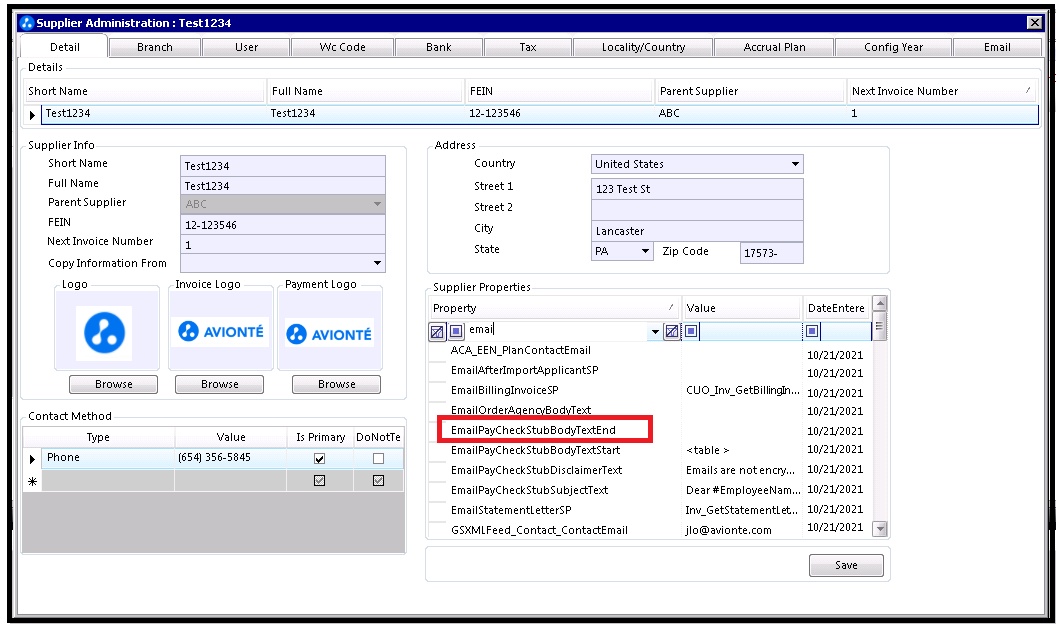
The EmailPayCheckStubBodyTextEnd property defines the ending body text of the email for sending a paycheck stub to an employee. The value must be entered in html format (as seen in the Default value shown in the table below).
EmailPayCheckStubBodyTextEnd properties
| Admin Tools location: | Employer Category: (Select Employer) > Detail tab |
| Default: |
<head> <style type="text/css"> .style1 { height: 23px; } </style> </head>
<table style="border:3px solid black;">
<tr><td style="width:200px;">YTD Gross</td><td style="width:80px; ">
<span style="color: rgb(0, 0, 0);
font-family: 'Times New Roman';
font-style: normal;
font-variant: normal;
font-weight: normal;
letter-spacing: normal;
line-height: normal;
orphans: 2;
text-align: -webkit-auto;
text-indent: 0px;
text-transform: none;
white-space: normal;
widows: 2;
word-spacing: 0px;
-webkit-text-size-adjust: auto;
-webkit-text-stroke-width: 0px;
font-size: medium;
display: inline !important;
float: none;"
> #YTDGross#</span>
</td></tr>
<tr><td>Gross Amt.</td><td>
<table cellpadding="0" cellspacing="0" class="t1" style="font-family: 'Times New Roman';
letter-spacing: normal;
orphans: 2;
text-indent: 0px;
text-transform: none;
widows: 2;
word-spacing: 0px;
-webkit-text-size-adjust: auto;
-webkit-text-stroke-width: 0px; "
>
<tr class="tr6"> <td class="td41" rowspan="2">
<font class="ft3">#GrossAmount#</font></td> </tr> </table> </td></tr>
<tr><td>Net Amt.</td><td>#NetAmount#</td></tr>
</table>
<br /> <br /> <br />
<table><tr><td>Pay</td><td>
<span style="color: rgb(0, 0, 0);
font-family: 'Times New Roman';
font-style: normal;
font-variant: normal;
font-weight: normal;
letter-spacing: normal;
line-height: normal;
orphans: 2;
text-align: -webkit-auto;
text-indent: 0px;
text-transform: none;
white-space: normal;
widows: 2;
word-spacing: 0px;
-webkit-text-size-adjust: auto;
-webkit-text-stroke-width: 0px;
font-size: medium;
display: inline !important;
float: none; "
> #NetAmountInWords#</span></td></tr>
</table>
<table><tr><td style="width:700px;">#StaffingCompany#</td><td style="width:200px;"> Check Number</td></tr>
<tr><td>#StaffingCompanyAddress#</td><td>
<table cellpadding="0" cellspacing="0" class="t2" style="font-family: 'Times New Roman';
letter-spacing: normal;
orphans: 2;
text-indent: 0px;
text-transform: none;
widows: 2;
word-spacing: 0px;
-webkit-text-size-adjust: auto;
-webkit-text-stroke-width: 0px; "
>
<tr class="tr9"> <td class="td59"> #CheckNumber#</td> </tr>
</table> </td></tr>
<tr><td class="style1"> </td><td class="style1">Check Date</td></tr>
<tr><td> </td><td>
<span style="color: rgb(0, 0, 0);
font-family: 'Times New Roman';
font-style: normal;
font-variant: normal;
font-weight: normal;
letter-spacing: normal;
line-height: normal;
orphans: 2;
text-align: -webkit-auto;
text-indent: 0px;
text-transform: none;
white-space: normal;
widows: 2;
word-spacing: 0px;
-webkit-text-size-adjust: auto;
-webkit-text-stroke-width: 0px;
font-size: medium;
display: inline !important;
float: none; "
> #CheckDate#</span></td></tr>
<tr><td> </td><td>Not VALID AFTER 90 days</td></tr>
<tr><td> </td><td>Amount</td></tr>
<tr><td></td><td>
<span style="color: rgb(0, 0, 0);
font-family: 'Times New Roman';
font-style: normal;
font-variant: normal;
font-weight: normal;
letter-spacing: normal;
line-height: normal;
orphans: 2;
text-align: -webkit-auto;
text-indent: 0px;
text-transform: none;
white-space: normal;
widows: 2;
word-spacing: 0px;
-webkit-text-size-adjust: auto;
-webkit-text-stroke-width: 0px;
font-size: medium;
display: inline !important;
float: none; "
> #NetAmount#</span>
</td></tr>
</table>
<table><tr><td>PAY TO THE ORDER OF</td><td>
<table cellpadding="0" cellspacing="0" class="t0" style="font-family: 'Times New Roman';
letter-spacing: normal;
orphans: 2;
text-indent: 0px;
text-transform: none;
widows: 2;
word-spacing: 0px;
-webkit-text-size-adjust: auto;
-webkit-text-stroke-width: 0px; "
>
<tr class="tr3"> <td class="td23"> #PayeeName#</td> </tr>
</table>
</td></tr>
<tr><td></td><td> </td></tr>
<tr><td></td><td> </td></tr>
<tr><td></td><td> </td></tr>
</table>
|
| Valid values: | Any valid text with markup. |
| Where the setting is reflected... | Paycheck stub. |
Comments
0 commentsPlease sign in to leave a comment.