Overview
Updated 07/08/2021
The Roster item of the Order section records information regarding the various assignments attached to an order.
Note: Visit the Assignment Schedule Roster help page for instructions about adding entries.

Field Chooser
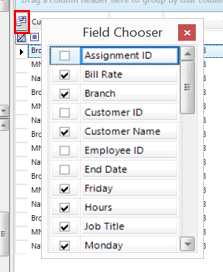
The field chooser on the Roster item allows data sorting by the following criteria:
| Field | Description |
| Assignment ID | Identification number for the assignment. |
| Bill Rate | Rate at which the customer is being billed. |
| Branch | The branch of the company the customer is associated with. |
| Customer ID | Identification number for the customer. |
| Customer Name | Name of the customer. |
| Employee ID | Identification number for the employee. |
| End Date | Date the assignment was completed. |
| Hours | Total number of hours worked by the employee during the week. |
| Job Title | Name of the position worked by the employee. |
| Name | Name of the employee. |
| Order ID | Identification number assigned to the order associated with the employee. |
| Pay Rate | Wage rate for the employee. |
| Performance | Indicates how well the employee has been at achieving the goals of the assignment. |
| Shift Name | Indicates the name of the shift worked by the employee (i.e. first, second, third, etc.) |
| SSN | Social Security Number for the employee. |
| Start Date | Date that the assignment began. |
| View |
Offers three icons that navigate to the summary items of the Employee section, Order section, and Assignment sections respectively. |
| Wc Code | Workers Compensation code. |
| Week | Displays the ending date for the week worked. |
| Sunday | Indicates the attendance status for the Sunday of the week worked. |
| Monday | Indicates the attendance status for the Monday of the week worked. |
| Tuesday | Indicates the attendance status for the Tuesday of the week worked. |
| Wednesday | Indicates the attendance status for the Wednesday of the week worked. |
| Thursday | Indicates the attendance status for the Thursday of the week worked. |
| Friday | Indicates the attendance status for the Friday of the week worked. |
| Saturday | Indicates the attendance status for the Saturday of the week worked. |
Double clicking on any row will open the Assignment Schedule Roster wizard. For more information on the Assignment Schedule Roster wizard click here.
Comments
0 commentsPlease sign in to leave a comment.