Overview
Updated 07/07/2021
The Detail item of the Agency section allows you to update and edit agency data. From this tab you are also able to create a New Agency and view the full Agency Actions Menu.
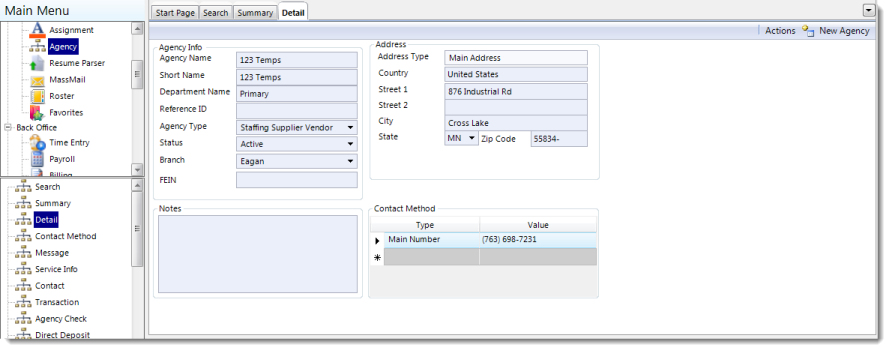
Information on the Detail item is recorded in the following groups:
Agency Info Group
| Field | Description |
| Agency Name | The full name of the agency. |
| Short Name | A short name, or nickname, for the agency. |
| Department Name | Name of the department attached to the agency. |
| Reference ID | Identification number used to identify the agency. |
| Agency Type | Indicate what kind of agency this is from the drop-down menu. |
| Status | Indicates the agency's status. |
| Branch | The branch that the agency is attached to. |
| FEIN | The agency's Federal Employment Identification Number.: |
Notes Group
Insert text into the field and press Tab on the keyboard to save the note.
Address Group
| Field | Description |
| Address Type | This field will default to the option indicated when the Agency was created. |
| Country | The country in which the agency is located. |
| Street Address 1 | The street address of the agency. |
| Street Address 2 | The street address of the agency. |
| City | The city in which the agency is located. |
| State/Province | The US state or Canadian province in which the agency is located. |
| Zip/Postal Code | The US Zip Code or Canadian Postal Code in which the agency is located. |
Contact Method Group
This group displays all active methods to get in touch with the agency.
Edit an existing contact method or add a new method to this group by entering data into the following columns:
| Field | Description |
| Type | The kind of contact method available (i.e., phone, email, website, etc.) |
| Value | The data corresponding to the type of contact method. |
Comments
0 commentsPlease sign in to leave a comment.